Security Shield description
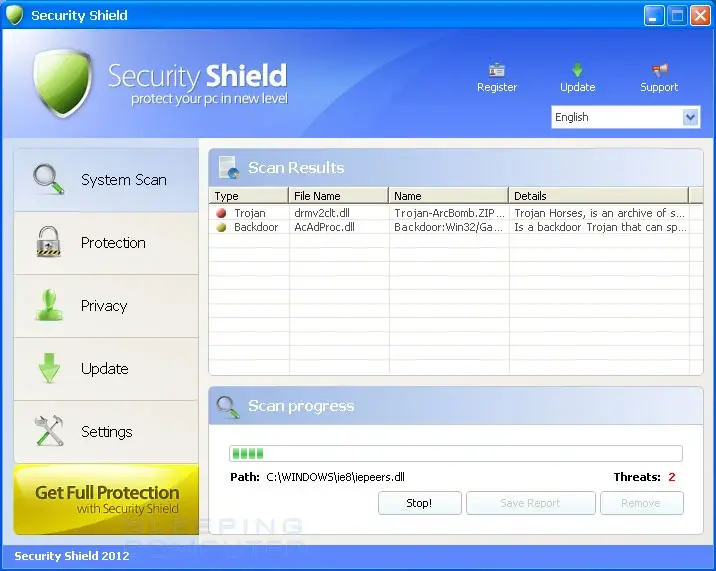
Security Shield is a new clone of SecurityTool fraud. Security Shield is a rogue program just like its predecessor.
The purpose of SecurityShield scam is tricking its victims into paying for the program by imitating actions of security tools. Security Shield reports tons of infections alerts. They are all fabricated and they all lead to purchasing a full version of the fraud. SecurityShield usually reports regular Windows files as they were compromised. Do not trust a single notification loaded by Security Shield! It is not able to function as antispyware or antivirus.
If Security Shield appears on your screen, try “registration code” 64C665BE-4DE7-423B-A6B6-BC0172B25DF2 to disable the pop-ups and then delete Security Shield as soon as possible.
Here are some examples of Security Shield pop-ups:
Security Shield Warning
Spyware.IEMonster activity detected. This form of spyware attempts to steal passwords from Internet Explorer, Mozilla Firefox, Outlook and other commonly used programs. Click here to immediately remove it with Security Shield.
Security Shield
Security Shield Firewall Alert
Security Shield has prevented a program from accessing the internet.
“iexplore.exe” is infected “Trojan-Dropper.Win32.Agent”. This worm has to tried to use “iexplore.exe” to connect to remove host and send your credit card information
Security Shield Warning
Intercepting malicious software that may violate your privacy and harm your computer has been detected. Click here to remove now with Security Shield.
Security Shield Warning
Some of the important system files on your PC were modified by malicious software. It may cause system crashes and data losses.
Click here to prevent non-authorized changes and remove threats (Recommended)
Security Shield
“cmd.exe” is infected with “Worm.Win32.Autorun.bnb”. Do you want to register your copy and remove all threats now?
Get rid of Security Shield
- Manual step-by-step Security Shield removal
- Automatic easy Security Shield detection with Spyware Doctor
- Anti spyware Software. Spyware Doctor Review.
Security Shield is a Rogue Antispyware software
How to manually remove Security Shield
To remove Security Shield spyware you must block Security Shield sites, stop and remove processes, unregister DLL files, search and delete all other Security Shield files and registry utility. Follow the Security Shield detection and removal instructions below.
The most typical software removal method is to remove Security Shield by using “Add or Remove Programs” service. However there may be hidden Security Shield files, running processes and registries in your computer, so Security Shield may recreate all other files after reboot.