How to remove Win 7 Security 2011

How to remove Win 7 Security 2011

Win 7 Security 2011 description

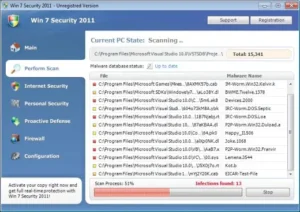
Win 7 Security 2011 is a rogue anti-spyware application. This one is particularly pesky as it adapts itself to victim’s operating system. Win7 Security 2011 changes its name and user interface. It may appear as Win7 Antispyware 2011 or Win 7 Internet Security 2011 I it finds Windows 7 on the compromised PC.

Win 7 Security 2011 is not able to deal with security problems because Win 7 Security 2011 is a computer parasite itself. It is installed by trojans. When Win 7 Security 2011 sneaks upon a computer, it loads numerous counterfeit warnings. None of them should be trusted. If clicked upon, the alerts demand purchasing Win 7 Security 2011. Don’t waste your money and remove Win 7 Security 2011 fraud as soon as possible.

Here are some examples of Win7 Security 2011 pop-ups:

Privacy threat!

Spyware intrusion detected. Your system is infected. System integrity is at risk. Private data can be stolen by third parties, including credit card details and passwords. Click here to perform a security repair.

Stealth intrusion!

Infection detected in the background. Your computer is now attacked by spyware and rogue software. Eliminate the infection safely, perform a security scan and deletion now.
Win 7 Security 2011 description Win 7 Security 2011 is a rogue anti-spyware application. This one is particularly pesky as it adapts itself to victim’s operating system. Win7 Security 2011 changes its name and user interface. It may appear as Win7 Antispyware 2011 or Win 7 Internet Security 2011 I it finds Windows 7 on the compromised PC. Win 7 Security 2011 is not able to deal with security problems because Win 7 Security 2011 is a computer parasite itself. It is installed by trojans. When Win 7 Security 2011 sneaks upon a computer, it loads numerous counterfeit warnings. None of them should be trusted. If clicked upon, the alerts demand purchasing Win 7 Security 2011. Don’t waste your money and remove Win 7 Security 2011 fraud as soon as possible. Here are some examples of Win7 Security 2011 pop-ups: Privacy threat! Spyware intrusion detected. Your system is infected. System integrity is at risk. Private data can be stolen by third parties, including credit card details and passwords. Click here to perform a security repair. Stealth intrusion! Infection detected in the background. Your computer is now attacked by spyware and rogue software. Eliminate the infection safely, perform a security scan and deletion now. Get rid of Win 7 Security 2011 download free spyware scanner Manual step-by-step Win 7 Security 2011 removal Automatic easy Win 7 Security 2011 detection with Spyware Doctor Anti spyware Software. Spyware Doctor Review. Win 7 Security 2011 is a Rogue Antispyware software Win 7 Security 2011 is installed without your permission. Win 7 Security 2011 reputation online is terrible. The official website of Win 7 Security 2011 is poorly built and lacks basic information. The payments website of Win 7 Security 2011 is suspicious. Performance of the program is poor. How to manually remove Win 7 Security 2011 To remove Win 7 Security 2011 spyware you must block Win 7 Security 2011 sites, stop and remove processes, unregister DLL files, search and delete all other Win 7 Security 2011 files and registry utility. Follow the Win 7 Security 2011 detection and removal instructions below. The most typical software removal method is to remove Win 7 Security 2011 by using "Add or Remove Programs" service. However there may be hidden Win 7 Security 2011 files, running processes and registries in your computer, so Win 7 Security 2011 may recreate all other files after reboot.


Get rid of Win 7 Security 2011

  • Manual step-by-step Win 7 Security 2011 removal
  • Automatic easy Win 7 Security 2011 detection with Spyware Doctor
  • Anti spyware Software. Spyware Doctor Review.

Win 7 Security 2011 is a Rogue Antispyware software

  • Win 7 Security 2011 is installed without your permission.
  • Win 7 Security 2011 reputation online is terrible.
  • The official website of Win 7 Security 2011 is poorly built and lacks basic information.
  • The payments website of Win 7 Security 2011 is suspicious.
  • Performance of the program is poor.

How to manually remove Win 7 Security 2011

To remove Win 7 Security 2011 spyware you must block Win 7 Security 2011 sites, stop and remove processes, unregister DLL files, search and delete all other Win 7 Security 2011 files and registry utility. Follow the Win 7 Security 2011 detection and removal instructions below.

The most typical software removal method is to remove Win 7 Security 2011 by using “Add or Remove Programs” service. However there may be hidden Win 7 Security 2011 files, running processes and registries in your computer, so Win 7 Security 2011 may recreate all other files after reboot.

Anna

Obsessed with technology and software.

More From Author

How to remove Security Shield

How to remove Security Shield

How to remove ClickPotato

How to remove ClickPotato

Leave a Reply

Your email address will not be published. Required fields are marked *

Categories

Subscribe

Email
The form has been submitted successfully!
There has been some error while submitting the form. Please verify all form fields again.

Recent Post