ClickPotato description
ClickPotato is an annoying adware targeting cinema lovers. Click Potato spreads via deceptive ads that offer watching the latest movies online.
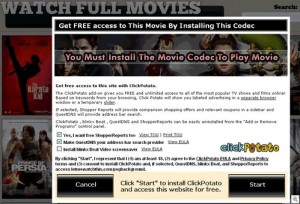
ClickPotato lurks on fraudulent websites that offer pirated movies. If a visitor wants to watch a movie, he is required to download a “video codec”. The video codec is actually the ClickPotato malware. It is dedicated to deliver unwanted advertisements. Some of them may lead to malicious or fraudulent websites. Even when the “codec” is installed, victims of this fraud still can’t watch any movie without the annoying advertisements. ClickPotato may also install a screensaver and it may change your home page.
Get rid of ClickPotato
- Manual step-by-step ClickPotato removal
- Automatic easy ClickPotato detection with Spyware Doctor
- Anti spyware Software. Spyware Doctor Review.
How to manually remove ClickPotato
To remove ClickPotato spyware you must block ClickPotato sites, stop and remove processes, unregister DLL files, search and delete all other ClickPotato files and registry utility. Follow the ClickPotato detection and removal instructions below.
The most typical software removal method is to remove ClickPotato by using “Add or Remove Programs” service. However there may be hidden ClickPotato files, running processes and registries in your computer, so ClickPotato may recreate all other files after reboot.
ClickPotato manual removal instructions
Stop and remove ClickPotato processes:
ClickPotatoLiteSA.exe
ClickPotatoLiteUninstaller.exeRead more how to kill ClickPotato processes
Locate and delete ClickPotato registry entries:
HKEY_LOCAL_MACHINE\SOFTWARE\Mozilla\Firefox\Extensions\”ClickPotatoLite@ClickPotatoLite.com” = “%ProgramFiles%\ClickPotatoLite\bin\[VERSION NUMBER]\firefox\extensions”
HKEY_LOCAL_MACHINE\SOFTWARE\Classes\AppID\MenuButtonIE.DLL
HKEY_LOCAL_MACHINE\SOFTWARE\Classes\AppID\{11C27351-716B-4052-9361-E3B0A3F8221C}
HKEY_LOCAL_MACHINE\SOFTWARE\Classes\CLSID\{1602F07D-8BF3-4c08-BDD6-DDDB1C48AEDC}
HKEY_LOCAL_MACHINE\SOFTWARE\Classes\CLSID\{7A3D6D17-9DD5-4C60-8076-D1784DABAF8C}
HKEY_LOCAL_MACHINE\SOFTWARE\Classes\CLSID\{AC6D819E-AA8F-4418-A3BB-D165C1B18BB5}
HKEY_LOCAL_MACHINE\SOFTWARE\Classes\Interface\{30B15818-E110-4527-9C05-46ACE5A3460D}
HKEY_LOCAL_MACHINE\SOFTWARE\Classes\Interface\{419EDA30-6DFF-432C-B534-E15D899ABEE4}
HKEY_LOCAL_MACHINE\SOFTWARE\Classes\Interface\{618AAD04-921F-44C2-BE38-C0818AF69861}
HKEY_LOCAL_MACHINE\SOFTWARE\Classes\Interface\{B5D2ED96-62F9-4C2C-956D-E425B1F67337}
HKEY_LOCAL_MACHINE\SOFTWARE\Classes\Interface\{D3A412E8-1E4B-47D2-9B12-F88291F5AFBB}
HKEY_LOCAL_MACHINE\SOFTWARE\Classes\TypeLib\{814BAA91-DC22-4350-87D6-0C86E93F7F08}
HKEY_LOCAL_MACHINE\SOFTWARE\Classes\TypeLib\{C55CA95C-324B-451C-B2D2-6E895AA75FEC}
HKEY_LOCAL_MACHINE\SOFTWARE\Classes\ClickPotatoLiteAx.Info
HKEY_LOCAL_MACHINE\SOFTWARE\Classes\ClickPotatoLiteAx.Info.1
HKEY_LOCAL_MACHINE\SOFTWARE\Classes\ClickPotatoLiteAX.UserProfiles
HKEY_LOCAL_MACHINE\SOFTWARE\Classes\ClickPotatoLiteAX.UserProfiles.1
HKEY_LOCAL_MACHINE\SOFTWARE\Classes\MenuButtonIE.ButtonIE
HKEY_LOCAL_MACHINE\SOFTWARE\Classes\MenuButtonIE.ButtonIE.1
HKEY_LOCAL_MACHINE\SOFTWARE\Microsoft\Internet Explorer\Extensions\{B58926D6-CFB0-45d2-9C28-4B5A0F0368AE}
HKEY_LOCAL_MACHINE\SOFTWARE\Microsoft\Internet Explorer\Low Rights\ElevationPolicy\{A078F691-9C07-4AF2-BF43-35E79EECF8B7}
HKEY_LOCAL_MACHINE\SOFTWARE\Microsoft\Windows\CurrentVersion\Ext\PreApproved\{1602F07D-8BF3-4c08-BDD6-DDDB1C48AEDC}
HKEY_LOCAL_MACHINE\SOFTWARE\Microsoft\Windows\CurrentVersion\Ext\PreApproved\{69725738-CD68-4f36-8D02-8C43722EE5DA}
HKEY_LOCAL_MACHINE\SOFTWARE\Microsoft\Windows\CurrentVersion\Ext\PreApproved\{AC6D819E-AA8F-4418-A3BB-D165C1B18BB5}
HKEY_LOCAL_MACHINE\SOFTWARE\Microsoft\Windows\CurrentVersion\Ext\PreApproved\{B58926D6-CFB0-45D2-9C28-4B5A0F0368AE}
HKEY_LOCAL_MACHINE\SOFTWARE\Microsoft\Windows\CurrentVersion\Uninstall\ClickPotatoLiteSA
HKEY_LOCAL_MACHINE\SOFTWARE\ClickPotatoLite
HKEY_CURRENT_USER\Software\clickpotatolitesaRead more how to delete ClickPotato registry entries
Download RegistryBooster 2010 to scan errors caused by ClickPotato
Search and unregister ClickPotato DLL libraries:
npclntax_ClickPotatoLiteSA.dll
ClickPotatoLiteSAAX.dll
ClickPotatoLiteSABHO.dll
ClickPotatoLiteSAHook.dllRead more how to unregister ClickPotato DLL files
Detect and delete other ClickPotato files:
C:\Documents and Settings\All Users\Application Data\ClickPotatoLiteSA\ClickPotatoLiteSA.dat
C:\Documents and Settings\All Users\Application Data\ClickPotatoLiteSA\ClickPotatoLiteSAAbout.mht
C:\Documents and Settings\All Users\Application Data\ClickPotatoLiteSA\ClickPotatoLiteSAau_update.dat
C:\Documents and Settings\All Users\Application Data\ClickPotatoLiteSA\ClickPotatoLiteSAEULA.mht
C:\Documents and Settings\All Users\Application Data\ClickPotatoLiteSA\ClickPotatoLiteSA_kyf_update.dat
C:\Documents and Settings\All Users\Start Menu\Programs\ClickPotato\About Us.lnk
C:\Documents and Settings\All Users\Start Menu\Programs\ClickPotato\ClickPotato Customer Support.lnk
C:\Documents and Settings\All Users\Start Menu\Programs\ClickPotato\ClickPotato Uninstall Instructions.lnk
%ProgramFiles%\Mozilla Firefox\plugins\npclntax_ClickPotatoLiteSA.dll
%ProgramFiles%\ClickPotatoLite\bin\[VERSION NUMBER]\ClickPotatoLiteSA.exe
%ProgramFiles%\ClickPotatoLite\bin\[VERSION NUMBER]\ClickPotatoLiteSAAX.dll
%ProgramFiles%\ClickPotatoLite\bin\[VERSION NUMBER]\ClickPotatoLiteSABHO.dll
%ProgramFiles%\ClickPotatoLite\bin\[VERSION NUMBER]\ClickPotatoLiteSAHook.dll
%ProgramFiles%\ClickPotatoLite\bin\[VERSION NUMBER]\ClickPotatoLiteUninstaller.exe
%ProgramFiles%\ClickPotatoLite\bin\[VERSION NUMBER]\firefox\extensions\install.rdf
%ProgramFiles%\ClickPotatoLite\bin\[VERSION NUMBER]\firefox\extensions\plugins\npclntax_ClickPotatoLiteSA.dll
We strongly recommend you to use spyware remover to track ClickPotato and automaticaly remove ClickPotato processes, registries and files as well as other spyware threats.