Maintaining sustained attention in an environment saturated with digital interruptions has become a critical challenge for professionals, students, and individuals seeking improved cognitive performance. The stimulation clicker has emerged as a targeted solution—combining behavioral psychology principles with interactive technology to enhance focus, track progress, and provide sensory engagement.Unlike passive productivity tools, stimulation clickers create active feedback loops that reinforce desired behaviors through immediate, measurable responses. This guide examines the science, applications, and selection criteria for these increasingly popular focus-enhancement devices.
What Is a Stimulation Clicker?
A stimulation clicker is an interactive device or digital application that delivers immediate sensory or data-driven feedback in response to user input. These tools leverage operant conditioning principles—where immediate reinforcement strengthens specific behaviors—to maintain engagement and improve task persistence.
Core feedback mechanisms include:
Visual feedback: Progress bars, animated counters, color-coded indicators, achievement notifications
Auditory feedback: Satisfying click sounds, completion tones, milestone alerts
Tactile feedback: Haptic vibrations, physical button resistance, texture-based responses
Data feedback: Real-time analytics, streak tracking, performance metrics, productivity scores
The fundamental design philosophy centers on creating a responsive interaction loop that transforms passive activities into engaging experiences while providing quantifiable progress indicators.
Types of Stimulation Clickers
Stimulation clickers span multiple formats, each optimized for specific use cases:
Digital productivity clickers feature task counters, habit trackers, and goal-monitoring dashboards that integrate with workflow management systems.
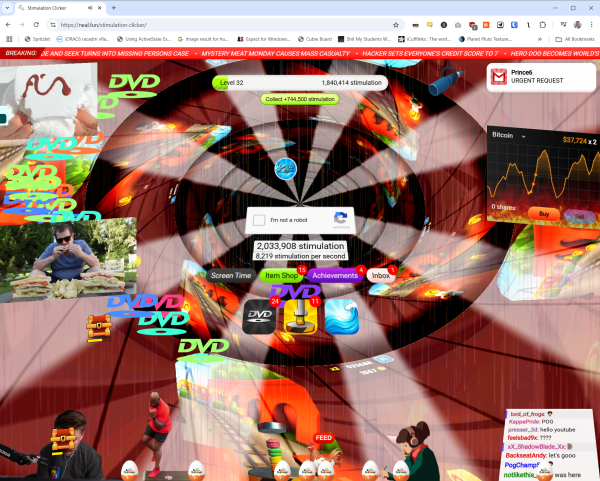
Gaming clicker applications utilize incremental mechanics where repeated clicking generates resources, unlocks content, or triggers progression systems.
Physical fidget clickers provide tactile stimulation through button mechanisms, offering stress relief and sensory regulation without screen dependency.
Educational response clickers enable real-time classroom participation, quiz engagement, and interactive learning assessment.
Behavioral modification clickers support habit formation, addiction recovery tracking, and therapeutic intervention programs.
The Science Behind How Stimulation Clickers Improve Focus
Stimulation clickers function through established neuropsychological mechanisms that influence attention, motivation, and cognitive endurance.
Immediate Feedback and Dopamine Response
The human brain’s reward system responds powerfully to immediate feedback. Each click triggering a visible or audible response activates dopamine pathways—the neurotransmitter associated with motivation and pleasure.
Research in behavioral psychology demonstrates that immediate reinforcement increases:
Task persistence: Users maintain effort longer when progress is visible Motivation levels: Small, frequent rewards sustain engagement better than delayed gratification Attention span: Interactive feedback reduces mind-wandering and task-switching behavior Completion rates: Visible progress creates psychological momentum toward goal achievement
This explains why productivity applications incorporating click-based progress indicators show measurably higher user retention than passive tracking alternatives.
Reducing Cognitive Load Through Structured Interaction
Stimulation clickers simplify complex tasks into manageable, clickable units. This chunking strategy reduces the cognitive burden of large projects by providing clear, actionable steps with immediate confirmation.
For individuals managing attention deficit challenges, the structured rhythm of click-response-reward creates an external scaffolding that compensates for executive function difficulties.
Active Engagement vs. Passive Consumption
Unlike passive productivity tools that merely record activity, stimulation clickers require deliberate interaction. This active participation strengthens neural pathways associated with the tracked behavior, reinforcing habit formation through repeated physical engagement.
Practical Applications of Stimulation Clicker Technology
The adaptability of stimulation clickers has led to widespread adoption across professional, educational, therapeutic, and personal development contexts.
Workplace Productivity and Performance Tracking
Modern work environments increasingly incorporate clicker-based systems for:
Deep work session tracking: Employees log focused work periods, building streaks that encourage consistency Project milestone completion: Visual progress indicators break large deliverables into trackable components Habit stacking for professionals: Sequential clicking reinforces morning routines, task transitions, or productivity rituals Team accountability metrics: Shared dashboards display collective progress, fostering collaborative motivation
Companies implementing interactive tracking systems report improvements in both individual productivity metrics and team engagement scores.
Gaming Mechanics and User Retention
The gaming industry pioneered sophisticated clicker mechanics that now influence productivity tool design. Idle clicker games and incremental games demonstrate how simple interaction loops create compelling engagement.
Key gaming applications include:
Resource accumulation systems: Clicking generates currency, materials, or experience points Achievement unlocking: Milestones trigger rewards, animations, and progression gates Engagement loops: Simple mechanics create satisfying, repeatable interactions Progression visualization: Users see cumulative impact of repeated actions
These gaming principles increasingly appear in non-gaming applications, from fitness trackers to language learning platforms.
Educational Technology and Classroom Response Systems
Educational settings leverage stimulation clickers to transform passive learning into interactive experiences:
Real-time polling and assessment: Teachers gauge comprehension instantly through student clicker responses Participation tracking: Systems record engagement levels, identifying students needing additional support Gamified learning activities: Quiz-based clicking adds competitive elements that increase motivation Formative assessment tools: Immediate feedback helps educators adjust instruction based on understanding gaps
Studies show that classroom response systems using clicker technology increase student attention, participation rates, and information retention compared to traditional lecture formats.
Mental Health Applications and Sensory Regulation Tools
Therapeutic contexts increasingly recognize stimulation clickers as valuable interventions for anxiety management, stress reduction, and sensory processing support.
Clinical applications include:
Anxiety symptom tracking: Clicking records anxiety episodes, helping identify triggers and patterns Grounding techniques: Tactile clicking provides present-moment focus during dissociative episodes Stimming alternatives: Physical clickers offer socially acceptable sensory stimulation for neurodivergent individuals Habit reversal training: Clicking serves as competing response in behavioral therapy for repetitive behaviors
Mental health professionals report that clients using clicker-based tracking demonstrate improved symptom awareness and intervention compliance.
Fitness and Habit Formation
Health and wellness applications integrate clicker mechanics to reinforce positive behaviors:
Hydration tracking: Users click each time they drink water, building consumption awareness Medication adherence: Clicking confirms doses taken, preventing missed medications Exercise repetition counting: Workout clickers track sets and reps with satisfying feedback Smoking cessation support: Each craving resisted earns a click, visualizing progress toward recovery goals
The immediate reinforcement makes abstract health goals tangible and psychologically rewarding.
Key Benefits of Using a Stimulation Clicker
Systematic implementation of stimulation clickers provides measurable advantages across cognitive, behavioral, and emotional domains.
Enhanced Task Engagement and Reduced Boredom
Interactive feedback transforms monotonous activities into goal-oriented experiences. The anticipation of visual or auditory confirmation creates micro-goals that maintain interest during repetitive tasks.
Improved Productivity Through Progress Visualization
Seeing accumulated clicks, completed streaks, or rising counters provides concrete evidence of effort. This visibility combats procrastination by making abstract progress tangible and psychologically satisfying.
Cognitive Stimulation and Mental Alertness
The active decision to click—even in simple tasks—maintains higher cognitive engagement than passive observation. This sustained attention improves information processing and reduces mental fatigue.
Accessibility Across Skill Levels and Populations
Stimulation clickers require minimal learning curves, making them accessible to diverse users. Children, elderly individuals, and those with cognitive impairments can effectively utilize basic clicker systems.
Behavioral Data Collection for Self-Improvement
Digital clickers generate valuable analytics about behavior patterns, productivity rhythms, and habit consistency. This data enables evidence-based adjustments to routines and goal-setting strategies.
Technology Powering Modern Stimulation Clickers
Contemporary stimulation clickers incorporate sophisticated technologies that enhance functionality and personalization.
Artificial Intelligence and Adaptive Feedback
AI algorithms analyze user patterns to deliver personalized encouragement, adjust difficulty levels, and predict optimal engagement times. Machine learning models identify when users need additional motivation or are at risk of abandoning tracked behaviors.
Cloud Synchronization and Cross-Platform Integration
Modern clicker applications sync data across smartphones, tablets, computers, and smartwatches. This seamless integration ensures users can maintain tracking consistency regardless of device access.
Haptic Technology for Tactile Feedback
Advanced haptic engines deliver nuanced vibration patterns that simulate physical clicking sensations. These tactile responses enhance the psychological reward of digital interactions, bridging the satisfaction gap between physical and digital clickers.
Biometric Integration for Automated Tracking
Emerging clicker systems integrate with heart rate monitors, sleep trackers, and activity sensors to automatically log behaviors without manual clicking—combining passive tracking benefits with active engagement options.
Gamification Frameworks and Reward Systems
Sophisticated reward architectures incorporate badges, leaderboards, level progression, and unlockable content. These gamification elements leverage psychological principles from game design to maximize long-term engagement.
Potential Challenges and Limitations of Stimulation Clickers
Despite significant benefits, stimulation clickers present considerations that users should evaluate.
Risk of Developing External Validation Dependency
Overreliance on external feedback mechanisms can undermine intrinsic motivation. Users may struggle to maintain behaviors when clicker systems become unavailable, having not developed internal reinforcement patterns.
Mitigation strategies include:
- Gradually reducing feedback frequency as habits solidify
- Combining clickers with reflection practices that build internal awareness
- Setting predetermined endpoints for clicker assistance
Potential for Distraction and Compulsive Clicking
Poorly designed clicker applications can become distractions themselves, with users clicking obsessively rather than focusing on underlying goals. Gaming-style clickers particularly risk encouraging mindless interaction over meaningful productivity.
Privacy Concerns and Data Security
Digital clicker applications collect detailed behavioral data, raising legitimate privacy questions. Users should verify that clicker platforms employ encryption, limit data sharing, and provide transparent privacy policies.
Measurement Without Meaningful Action
Tracking behaviors through clicking doesn’t guarantee progress toward meaningful outcomes. Users may accumulate impressive click counts while failing to achieve substantive goals—confusing activity with accomplishment.
Limited Effectiveness for Complex Cognitive Tasks
Stimulation clickers excel at reinforcing discrete, measurable behaviors but prove less effective for complex cognitive work requiring sustained deep thinking without interruption.
How to Choose the Right Stimulation Clicker for Your Needs
Selecting an appropriate stimulation clicker requires matching tool characteristics to specific goals and preferences.
Define Your Primary Objective
For focus improvement: Choose clickers emphasizing work session tracking and distraction monitoring
For habit formation: Select tools offering streak tracking, reminder systems, and consistency metrics
For stress relief: Prioritize physical clickers with satisfying tactile feedback
For productivity measurement: Opt for analytics-rich platforms providing detailed performance insights
For gaming entertainment: Explore incremental clicker games with progression systems
Evaluate Feedback Modalities
Consider which sensory channels most effectively reinforce your behaviors:
Visual learners benefit from animated counters and color-coded progress indicators
Auditory processors respond well to sound-based confirmation and completion tones
Kinesthetic individuals need tactile feedback through physical buttons or haptic vibrations
Many users find multi-modal feedback—combining visual, auditory, and tactile elements—most effective.
Assess Customization and Flexibility
Quality stimulation clickers offer adjustable settings for:
- Feedback intensity and frequency
- Visual themes and interface design
- Goal parameters and tracking categories
- Notification timing and content
- Data export and reporting options
Customization ensures the tool adapts to evolving needs rather than imposing rigid structures.
Verify Privacy Protections and Data Ownership
Before committing to digital clicker platforms, research:
- Data encryption standards during transmission and storage
- Third-party data sharing policies
- User data deletion procedures
- GDPR and CCPA compliance status
- Company reputation regarding privacy breaches
Prioritize platforms offering transparent privacy practices and minimal data collection.
Consider Integration Capabilities
Stimulation clickers providing ecosystem integration deliver enhanced value:
- Calendar synchronization for time-based tracking
- Task management platform connections
- Wearable device compatibility
- Team collaboration features for shared goals
- API access for custom workflow automation
Popular Stimulation Clicker Tools and Platforms
While individual needs vary, several categories of stimulation clickers have gained substantial user bases.
Productivity-Focused Clicker Applications
Digital habit trackers combine click-based logging with analytics dashboards, enabling users to monitor multiple behaviors simultaneously. These platforms typically offer streak tracking, goal setting, and progress visualization.
Physical Fidget Clickers and Tactile Devices
Handheld clicker devices provide portable stress relief without screen dependency. These range from simple button mechanisms to multi-sensory devices incorporating textures, switches, and rotating components.
Educational Response Systems
Classroom clicker systems enable interactive polling, quiz participation, and real-time feedback collection. Both physical remote systems and smartphone-based applications serve this market.
Gaming Clicker Experiences
Incremental clicker games offer entertainment through resource accumulation, upgrade systems, and prestige mechanics. These games demonstrate pure clicker engagement without external productivity goals.
Best Practices for Maximizing Stimulation Clicker Effectiveness
Strategic implementation determines whether stimulation clickers enhance or distract from meaningful progress.
Start with Single-Behavior Tracking
Avoid overwhelming yourself by tracking numerous behaviors simultaneously. Focus initial clicking on one high-priority habit, establishing consistency before expanding tracking scope.
Establish Clear Success Criteria Beyond Clicks
Define what accumulated clicks represent in real-world terms. Connect clicking to tangible outcomes—completed work sessions, maintained sobriety days, or workout consistency—rather than treating clicks as ends themselves.
Schedule Regular Review Sessions
Weekly or monthly analysis of clicking data reveals patterns, identifies obstacles, and enables informed adjustments. Review sessions transform raw click counts into actionable insights.
Combine Clickers with Reflection Practices
Pair quantitative clicking data with qualitative reflection through journaling or self-assessment. This combination builds internal awareness alongside external tracking.
Plan Transition Strategies
Develop explicit plans for reducing clicker dependence as behaviors become habitual. Gradually extending intervals between clicks or transitioning to periodic check-ins prevents external validation dependency.
Future Trends in Stimulation Clicker Technology
Emerging technologies promise to expand stimulation clicker capabilities significantly.
AI-Powered Personalized Coaching
Next-generation clickers will leverage artificial intelligence to provide contextual encouragement, predictive insights about behavior patterns, and adaptive difficulty adjustments that optimize engagement.
Wearable Device Integration
Smartwatches, fitness bands, and augmented reality glasses will enable seamless clicking through gesture recognition, voice commands, and ambient tracking that reduces friction in behavior logging.
Virtual and Augmented Reality Experiences
VR and AR platforms will create immersive clicking environments where users interact with three-dimensional progress visualizations, spatial goal tracking, and collaborative clicking experiences.
Biometric Feedback Loops
Integration with heart rate variability, skin conductance, and brain activity monitoring will enable clickers that automatically adjust feedback based on physiological stress levels and attention states.
Social Accountability Networks
Expanded social features will facilitate accountability partnerships, group challenges, and collective goal pursuit where clicking contributes to shared objectives and community progress.
Neuroscience-Informed Design
Ongoing research into attention, motivation, and habit formation will inform clicker designs optimized for specific cognitive profiles, learning styles, and neurological conditions.
Conclusion: Leveraging Stimulation Clickers for Sustainable Improvement
Stimulation clickers represent a practical intersection of behavioral psychology, user experience design, and performance optimization. When thoughtfully selected and strategically implemented, these tools provide measurable support for focus enhancement, habit formation, and productivity improvement.
Success requires matching clicker characteristics to individual needs, maintaining awareness of potential dependency risks, and viewing clicking as a supportive mechanism rather than a primary goal. The most effective implementations combine quantitative tracking with qualitative reflection, building both external accountability and internal motivation.
As technology advances, stimulation clickers will likely become more sophisticated, personalized, and integrated into broader wellness and productivity ecosystems. Users who develop informed, intentional relationships with these tools position themselves to benefit from enhanced focus and sustained behavioral change.
The key is remembering that clicks measure progress—they don’t create it. Real improvement comes from the behaviors being tracked, with the stimulation clicker serving as a catalyst, accountability partner, and visualization tool supporting meaningful transformations.
5 FAQ Questions (Based on People Also Ask)
Q1: What is a stimulation clicker used for?
A stimulation clicker is used to improve focus, track habits, and provide immediate feedback through visual, auditory, or tactile responses. It helps maintain engagement during tasks and reinforces positive behaviors through interactive feedback mechanisms.
Q2: Do stimulation clickers actually improve productivity?
Yes, stimulation clickers can improve productivity by providing immediate reinforcement, visualizing progress, and maintaining engagement through active feedback loops. Research shows that immediate feedback increases task persistence and completion rates.
Q3: Are stimulation clickers good for ADHD?
Stimulation clickers can be beneficial for individuals with ADHD by providing external structure, immediate feedback, and tactile engagement that helps maintain focus. The interactive nature compensates for executive function challenges and reduces mind-wandering.
Q4: What’s the difference between a physical and digital stimulation clicker?
Physical stimulation clickers provide tactile feedback through button mechanisms without screen time, ideal for stress relief. Digital clickers offer advanced features like analytics, cloud sync, and customizable feedback but require device access.
Q5: Can you become too dependent on stimulation clickers?
Yes, overreliance on stimulation clickers can reduce intrinsic motivation. To prevent dependency, gradually decrease feedback frequency as habits form, combine clicking with self-reflection, and set predetermined endpoints for clicker assistance.