Malware Destructor 2011 description

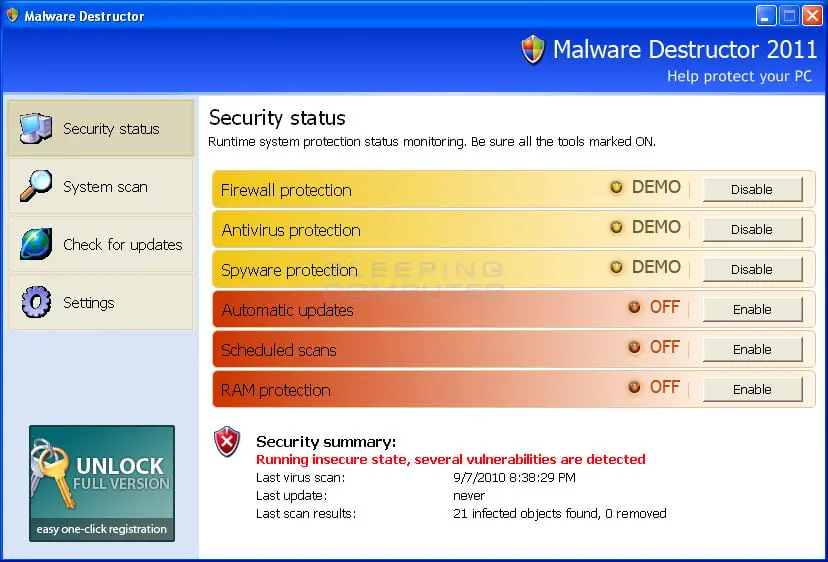
Malware Destructor 2011 a rogue tool using design similar to Windows security center. It is able to mimic system scan and security alerts but it is not a real security application.
MalwareDestructor 2011 is usually installed by trojan KB1883574.exe. The trojan loads a fake system notification which offers downloading update for the operating system:
Automatic Updates
System Security Pack Update
System Pack 2010.78.932 (Malware Destructor Upgrade; KB943379)
Malware Destructor 2011 is also advertised via deceptive online scanners.

Malware Destructor 2011 delivers numerous security warnings asking to buy a full version for fixing system up. The program is not capable of doing anything similar to protecting a computer or deleting viruses. The warnings loaded by Malware Destructor 2011 are smartly masked advertisements.
MalwareDestructor2011 may redirect web browser to deceptive websites in order to push people into paying for the software. The fraud may also interrupt work of other applications and especially the functions of security tools.
Get rid of Malware Destructor 2011
- Manual step-by-step Malware Destructor 2011 removal
- Automatic easy Malware Destructor 2011 detection with Spyware Doctor
- Anti spyware Software. Spyware Doctor Review.
Malware Destructor 2011 is a Rogue Antispyware software
How to manually remove Malware Destructor 2011
To remove Malware Destructor 2011 spyware you must block Malware Destructor 2011 sites, stop and remove processes, unregister DLL files, search and delete all other Malware Destructor 2011 files and registry utility. Follow the Malware Destructor 2011 detection and removal instructions below.
The most typical software removal method is to remove Malware Destructor 2011 by using “Add or Remove Programs” service. However there may be hidden Malware Destructor 2011 files, running processes and registries in your computer, so Malware Destructor 2011 may recreate all other files after reboot.
Malware Destructor 2011 manual removal instructions
Block Malware Destructor 2011 sites:
avscanner.netRead more how to block Malware Destructor 2011 sites
Stop and remove Malware Destructor 2011 processes:
KB1883574.exeRead more how to kill Malware Destructor 2011 processes
Locate and delete Malware Destructor 2011 registry entries:
HKEY_CURRENT_USER\Software\Malware Destructor Inc
HKEY_CURRENT_USER\Software\Microsoft\Windows\CurrentVersion\Uninstall\Malware Destructor
HKEY_CURRENT_USER\Software\Microsoft\Windows\CurrentVersion\Run “KB1883574.exe”Read more how to delete Malware Destructor 2011 registry entries
Download RegistryBooster 2010 to scan errors caused by Malware Destructor 2011
Detect and delete other Malware Destructor 2011 files:
%UserProfile%\Application Data\\
%UserProfile%\Application Data\\enemies-names.txt
%UserProfile%\Application Data\\KB1883574.exe
%UserProfile%\Application Data\\local.ini
%UserProfile%\Application Data\Microsoft\Internet Explorer\Quick Launch\Malware Destructor.lnk
%UserProfile%\Desktop\Malware Destructor.lnk
%UserProfile%\Start Menu\Malware Destructor.lnk
%UserProfile%\Start Menu\Programs\Malware Destructor\
%UserProfile%\Start Menu\Programs\Malware Destructor\Malware Destructor.lnk
%UserProfile%\Start Menu\Programs\Malware Destructor\Uninstall.lnk
%UserProfile%\Start Menu\Programs\Startup\Malware Destructor.lnk
We strongly recommend you to use spyware remover to track Malware Destructor 2011 and automaticaly remove Malware Destructor 2011 processes, registries and files as well as other spyware threats.