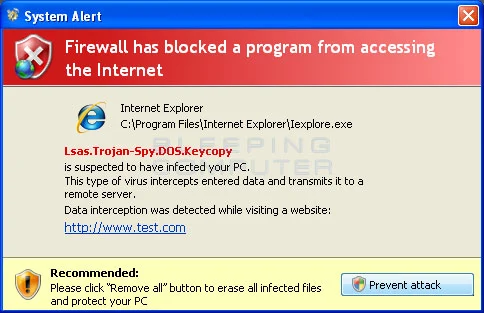
System Security Warning – Intercepting programs description
“System Security Warning: Intercepting programs” is one of several annoying system tray alerts loaded by System Security fraud.
System Security Warning
Intercepting programs that may compromised your privacy and harm your system have been detected on your PC. Click here to remove them immediately with System Security.
The text on System Security Warning is deceiving: System Security is not able to detect or delete anything. The “System Security Warning – Intercepting programs” is only a sign of SystemSecurity malware residing on your PC. Do get trapped by this fraud and don’t waste your money on fake anti-spyware. Remove System Security as soon as possible.
Get rid of System Security Warning – Intercepting programs
- Manual step-by-step System Security Warning – Intercepting programs removal
- Automatic easy System Security Warning – Intercepting programs detection with Spyware Doctor
- Anti spyware Software. Spyware Doctor Review.
How to manually remove System Security Warning – Intercepting programs
To remove System Security Warning – Intercepting programs spyware you must block System Security Warning – Intercepting programs sites, stop and remove processes, unregister DLL files, search and delete all other System Security Warning – Intercepting programs files and registry utility. Follow the System Security Warning – Intercepting programs detection and removal instructions below.
The most typical software removal method is to remove System Security Warning – Intercepting programs by using “Add or Remove Programs” service. However there may be hidden System Security Warning – Intercepting programs files, running processes and registries in your computer, so System Security Warning – Intercepting programs may recreate all other files after reboot.
System Security Warning – Intercepting programs manual removal instructions
Block System Security Warning – Intercepting programs sites:
watchnetprotection.com
systemsecurityonline.com
thesafedownload.com
ewebscan.com
webreadon.com
stabilityinternetglobalonline.com
stabilityonline.com
bestfiresfull.com
mostpopularscan.com
onlinescanservice.com
getscanonline.com
yourstabilitysystem.com
best-click-scanner.info
safetyscansite.com
wwwprotectionread.com
webprotectionreads.com
scanvistanow.com
scanalertpage.com
vistastabilitynow.com
internetsafetyexamine.com
bestcleaner.us
scanbaseonline.com
getpcguard.com
ultracleaner.us
ultracleaner.biz
securityscanguide.com
thegreatsecurity.com
wwwmobilereads.com
interinetskim.com
fullandtotalsecurity.com
mo-money-mo-problems.com
darksideddl.com
secureserver1.cc
webwidesecurity.com
scanprotectiononline.com
onlinebrandsecurity.com
securityscan4you.com
free-web-scaners.info
loyal-porno.com
thebestsecurityspot.com
topsecurity4you.com
trustsecurityshield.com
greatonlinesecurityscan.com
fastviruscleaner.com
globalsecurityscan.com
theonlinesecurity.com
totalvirushield.com
justwebsecurity.com
greatscansecurity.com
fullvirusprotection.com
freewebmypcscan.com
allowedwebsurfing.com
protectionreads.com
internetsecuritymetrics.com
webstoresecurity.com
securityimplement.com
installdiskscaner.net
securityonlinesite.com
universal-antivirus.com
ourbestsecurityshield.com
safetyscanguide.com
scan-av-express.com
securitytoolsdirect.com
antivir-scann-64bit.com
sucleaner.com Read more how to block System Security Warning – Intercepting programs sites
Stop and remove System Security Warning – Intercepting programs processes:
1632575944.exe
1975936162.exe Read more how to kill System Security Warning – Intercepting programs processes
Locate and delete System Security Warning – Intercepting programs registry entries:
HKEY_LOCAL_MACHINE\SOFTWARE\Microsoft\Windows\CurrentVersion\Run\”1632575944″ Read more how to delete System Security Warning – Intercepting programs registry entries
Download RegistryBooster 2010 to scan errors caused by System Security Warning – Intercepting programs
Detect and delete other System Security Warning – Intercepting programs files:
C:\Documents and Settings\All Users\Application Data\538654387\1632575944.exe
C:\Documents and Settings\All Users\Application Data\538654387\Languages\German.lng
C:\Documents and Settings\All Users\Application Data\538654387\Languages\English.lng
C:\Documents and Settings\All Users\Application Data\538654387\Languages\Spanish.lng
C:\Documents and Settings\All Users\Application Data\538654387\Languages
C:\Documents and Settings\All Users\Application Data\538654387\init.udb
C:\Documents and Settings\All Users\Application Data\538654387\config.udb
C:\Documents and Settings\All Users\Application Data\538654387\1632575944.exe
C:\Documents and Settings\All Users\Application Data\538654387
%UserProfile%\Start Menu\Programs\System Security\System Security.lnk
%UserProfile%\Start Menu\Programs\System Security
%UserProfile%\Desktop\System Security.lnk
We strongly recommend you to use spyware remover to track System Security Warning – Intercepting programs and automaticaly remove System Security Warning – Intercepting programs processes, registries and files as well as other spyware threats